Saturday, June 12, 2010

Star Topology

Click Here For Free Windows Downloads
mywindowsdownloads.blogspot.com

Click here for all Free Linux Downloads


Blog address for Linux in Hindi

Star Topology

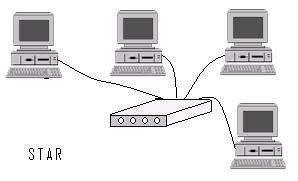
In this topology each computer gets connected to a central device called switch, with the help of LAN card installed in each PC. Cable used is generally UTP Cat-5. We prepare straight through cable by fixing RJ45 connectors on this cable.

Advantages of this topology are that we can use low specification cable. Failure of one node will no affect the rest of the network computers.

Following figure is the example of Star topology:

Friday, June 11, 2010

LAN topologies

Click Here For Free Windows Downloads
mywindowsdownloads.blogspot.com

Click here for all Free Linux Downloads


Blog address for Linux in Hindi

Creating and configuring LAN


For setting up LAN, we have three basic steps, which are as follows:


  1. Setup the LAN hardware
  2. Configure IP address
  3. Identify computers and Start network service

Setup the LAN hardware


Before setting up the network we will have to make some basic decisions about how the computers will be connected to each other. This part is known as LAN topology. And after this we will have to decide about the network equipments like network cards, cable and connectors, switches etc.


Cable LAN topologies


Connecting computers on LAN is called topology. To connect computers together using cable, most of the home or small offices use any one of the following topologies,:


  • Star
  • Bus
  • Ring
  • Tree